 Speed Patterns


Enhance Fonts As They Load
Custom web fonts are a powerful brand and design tool, but they cost the user time. A font file has to be downloaded, parsed and applied before any text styled with it can be rendered. Until then, the browser must decide what to do — and the wrong default ruins the reading experience.
The Problem: FOIT and FOUT
Browsers have historically picked between two unpleasant defaults:
- FOIT — Flash of Invisible Text. The browser hides text styled with a custom font until the font finishes loading. The user sees a layout with empty holes where the words should be. On a slow connection, the page can be visually "loaded" for several seconds with no readable content
- FOUT — Flash of Unstyled Text. The browser uses a fallback font immediately and swaps to the custom font when it loads. Text is readable from the first paint, but the swap can shift layout and feel jarring
Pure FOIT is the worse failure mode: the user can't even start reading. But a careless FOUT — a fallback font with very different metrics — is also painful.
Solution
Fallback text is legible from the first paint; the branded font swaps in once it loads, without leaving the user waiting on a blank page.
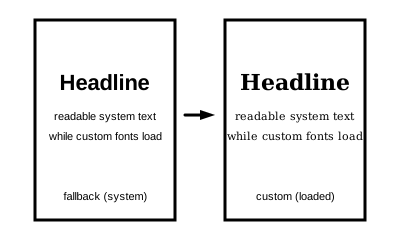
Treat custom fonts as a progressive enhancement, not a render blocker. Show legible fallback text from the first paint, then upgrade to the branded font when it arrives. Choose the fallback so the swap is as imperceptible as possible.
The strategy has three parts:
- Show fallback text immediately. Configure each web font so the browser uses a system fallback while the custom font downloads, instead of hiding the text
- Match fallback metrics to the custom font. Pick a system fallback whose size, ascent, descent and line-height align closely with the branded font, so the swap doesn't shift layout
- Prioritize which fonts get loaded urgently. Most pages don't need every weight and style up front. Subset, preload and self-host only what the first view actually needs
The first piece of legible text is what lets the user start reading. By showing fallback text immediately, you let reading begin at first paint instead of after a network round-trip. The brand fidelity arrives a moment later — at a cost of a small, near-invisible re-render rather than a blank page.
Guidelines
- Don't block the first paint on font network requests. Fallback text should always be visible immediately
- Test with a slow network throttle. FOIT is invisible on a fast connection. The pattern is built for the user on the slow one
- Audit your font weights. Each weight is a separate download. Many sites ship four or five weights and use two
- Subset to what you actually use. Latin-only subsets are dramatically smaller than full Unicode files; per-page subsets are smaller still
- Self-host the critical fonts. Third-party font CDNs add a DNS lookup, an extra connection and a privacy consideration
Related Patterns
- Fast Start — fonts are one of the most common blockers of first contentful paint
- Immutable Layout — well-tuned fallback metrics keep the swap from causing layout shift
Technical Implementation
Use font-display
The CSS font-display descriptor tells the browser how to behave while the custom font loads:
@font-face {
  font-family: "BrandSans";
  src: url("/fonts/BrandSans.woff2") format("woff2");
  font-display: swap;
}swap— show fallback immediately, replace with custom font when ready. Best for branded text where the custom font is importantoptional— show fallback immediately, only use the custom font if it arrives almost instantly (otherwise stick with the fallback). Best for users on slow connections, since it eliminates layout shift after the first framefallback— a compromise between the two
Avoid the default (auto/block), which produces FOIT.
Match fallback metrics
When the swap happens, lines may rewrap, headings may shift, and Cumulative Layout Shift increases. Modern CSS makes this almost solvable:
@font-face {
  font-family: "BrandSans";
  src: url("/fonts/BrandSans.woff2") format("woff2");
  font-display: swap;
  size-adjust: 102%;
  ascent-override: 95%;
  descent-override: 22%;
  line-gap-override: 0%;
}
Tools like Fontaine and Monica Dinculescu's Font Style Matcher help find values that make a system fallback nearly indistinguishable in metrics from your branded font.
Preload and use modern formats
- Preload critical fonts with
<link rel="preload" as="font" type="font/woff2" crossorigin>so the browser fetches them before discovering them in CSS - Use
woff2— it's the smallest format and supported everywhere - Subset to only the characters and weights you actually use